
Lifetime usage licence for one Windows computer
EDUCATION · WINDOWS SOFTWARE
Manage your daily work with AI Multi-Institution Timetable & Academic Scheduling Suite.
AI-Powered School Timetable Generator for Modern Schools.
AI Multi-Institution Timetable & Academic Scheduling SuitePRODUCT OVERVIEW
Since 2016Software experienceWindowsDesktop & laptopSchools Made for this business19 Actual ScreensSee before you decide
FLEXIBLE PAYMENT OPTION
✦ Easy EMI Available
Pay in monthly instalments using eligible Credit Card, Debit Card, Cardless EMI or Pay Later options.
See options at checkoutTenure, interest, offers and approval depend on the bank/payment provider and customer eligibility.
QUICK SUMMARY BEFORE YOU DECIDE
Price, licence and support—all in one place.
Review the software screens, features and computer suitability before payment.
Optional 1-year AMC; select it in the purchase form
Eligible EMI/Pay Later options at checkout
Download, installation and activation guidance
✓ Registered Indian company✓ GST invoice✓ Secure Razorpay payment✓ Hindi and English assistance
EMI tenure, interest, offers and approval depend on the bank/payment provider and customer eligibility. Confirm installation, training and support scope before payment.CLEAR ANSWERS BEFORE PAYMENT
Important purchase information
Is EMI available?+
Yes. Eligible Credit Card, Debit Card, Cardless EMI or Pay Later options may appear at Razorpay Checkout. Final tenure, interest and approval depend on the bank/provider and eligibility.
What happens after payment?+
After successful payment verification, purchase confirmation, GST invoice details and software download, installation and activation guidance will be provided.
What does lifetime licence mean?+
A lifetime usage licence allows use of the purchased software on the stated Windows computer. Future support, AMC, updates, reinstallation or extra-computer licences are included only when clearly stated.
Are installation and training included?+
The scope can vary by product and purchase plan. Confirm the included installation, training and support with Sales before payment.
COMPANY & PAYMENT IDENTITY
Know the company you are purchasing from.
Razorpay Checkout may display ORBIT GROUP as the merchant name. The brand and legal business relationship is explained below.
Industry-specific Windows software brand for Indian businesses.
Owner and operator of the oRRbit™ software brand.
The company conducts its business under the trade name ORBIT GROUP.
+91 74899 24776 · contact@orrbit.in
“oRRbit™ is a software brand owned and operated by oRRbit Slickteq Softech Pvt. Ltd., which conducts its business under the trade name ORBIT GROUP.”
REGISTERED OFFICE
9th Floor, PS Arcadia Central, 4A Camac Street, Kolkata, West Bengal 700071
CORPORATE OFFICE
B.Incube, Nutan Chowk, Seepat Road, Sarkanda, Bilaspur, Chhattisgarh 495006
BUILT AROUND ACTUAL BUSINESS WORK
Not just another general billing tool.
Build practical timetables with intelligent conflict handling.
AI Multi-Institution Timetable & Academic Scheduling Suite helps keep your connected daily workflow, records and reports organised in one place.
ONE CONNECTED JOURNEY
From School Setup to AI Clash Detection .
Each step remains connected with organised records.
School Setup
Manage school setup as part of one connected workflow.
Classes & Subjects
Manage classes & subjects as part of one connected workflow.
Teacher Mapping
Manage teacher mapping as part of one connected workflow.
Period Setup
Manage period setup as part of one connected workflow.
Auto Timetable Generation
Manage auto timetable generation as part of one connected workflow.
AI Clash Detection
Manage ai clash detection as part of one connected workflow.
EXPLORE THE ACTUAL PRODUCT
See what your team will use.
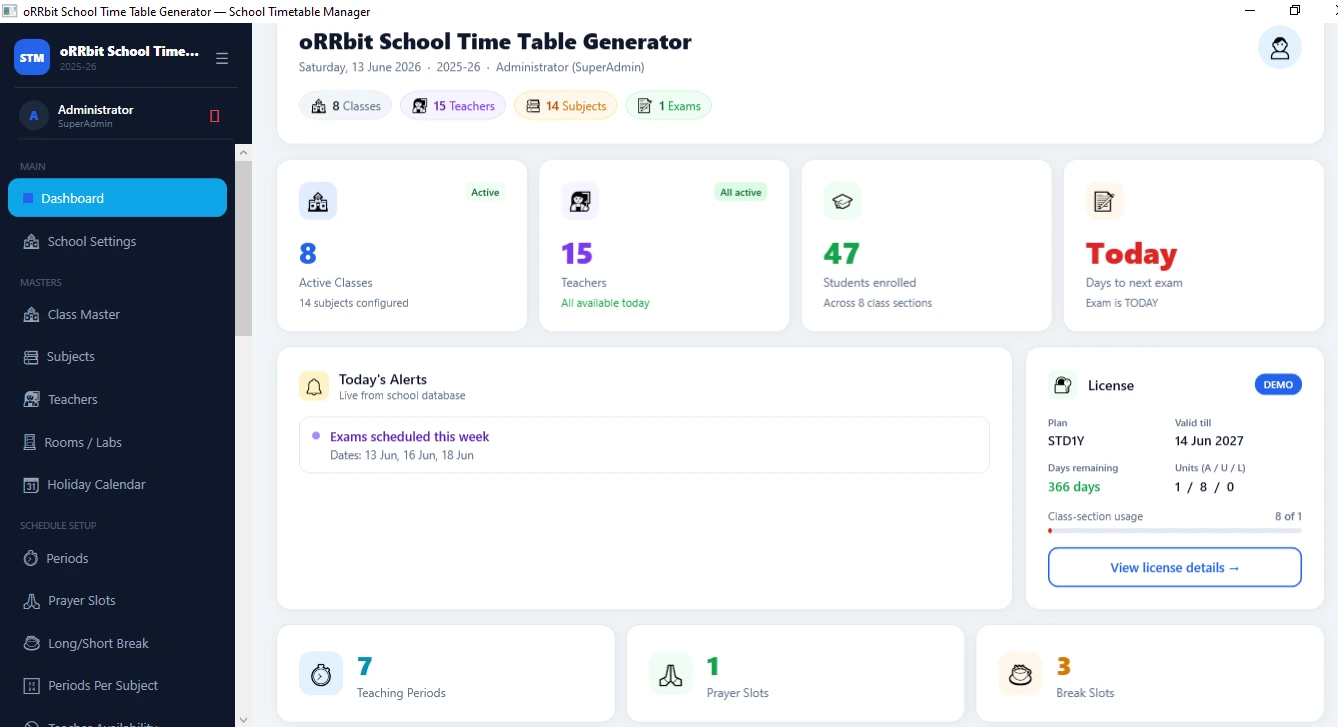
Choose a screen. These are actual software screenshots—not mock-ups.
DashboardClick image to enlarge
IS IT RIGHT FOR YOUR BUSINESS?
A practical fit for Schools .
This software may suit your team if manual registers, scattered files, pending work or reports take too much time.
Discuss your requirements →01
Few clicks mein automatic school timetable generate karein.
✓02
AI Teacher Clash Detection se teacher double-booking avoid karein.
✓03
Teacher workload analysis se fair period distribution maintain karein.
✓04
Class-wise aur teacher-wise timetable easily view, print aur share karein.
✓CAPABILITIES
Deep enough for daily work. Simple enough for your team.
Open a group to check every available function.
01AI Enabled Features
21 functions+
- 🤖 AI Teacher Clash Detection Before Final Timetable
- 🤖 AI-Based Teacher Workload Balancing
- 🤖 AI-Based Timetable Quality Score Check
- 🤖 AI Smart Dashboard Alerts & Suggestions
- 🤖 AI-Powered Data Quality & Duplicate Record Check
- 🤖 AI-Based Substitute Teacher Suggestion
- 🤖 AI-Generated Principal Summary Report
- 🤖 AI-Powered Excel Import Column Mapping
- 🤖 AI-Based Board Profile Period Template
- 🤖 AI-Based Proactive Problem Alerts
- 🤖 AI-Based Day Quality Analysis
- 🤖 Live Teacher Clash Warning During Manual Timetable Editing
- 🤖 AI Teacher Fatigue Detection
- 🤖 AI Class Load Analysis
- 🤖 AI Absence Pattern Detection
- 🤖 Smart AI Exam Seating Validation
- 🤖 AI-Based Data Validation Before Import
- 🤖 AI-Powered Report Summary for Easy Decision-Making
- 🤖 AI-Based Smart Subject Weekly Distribution
- 🤖 AI-Powered Academic Year Calendar Planning
- 🤖💬 AI Ask Assistant – Software ko Simple Language Mein Command Dein
02School Setup / Master Data
7 functions+
- School Settings
- Class Master
- Subjects
- Teachers
- Rooms / Labs
- Holiday Calendar
- Students
03Timetable Rules & Configuration
8 functions+
- Periods
- Prayer Slots
- Long / Short Break
- Periods Per Subject
- Teacher Availability
- Double Periods
- Fixed Period Slots
- Elective Groups
04Timetable Management
4 functions+
- Class Timetable
- TT Versions
- Substitute Entry
- Class TT Summary
05Attendance Management
1 functions+
- Teacher Attendance
06Exam Management
4 functions+
- Exam Master
- Exam Timetable
- Seating / Admit Card
- Exam TT Summary
07Reports & Analytics
1 functions+
- All Reports
08Import / Export
2 functions+
- Bulk Import (Excel)
- Excel Export
09License & Activation
2 functions+
- License Status
- License Reports
10Admin & Security
2 functions+
- User Management
- Activity / Audit Log
11Data Management
1 functions+
- Backup & Restore
SECURE ONLINE PURCHASE
Pay once. Use your software for life.
Enter billing details, choose optional AMC and pay securely through Razorpay. GST is calculated before payment.
01DetailsName, mobile & email
02ReviewPrice, AMC & GST
03PaySecure Razorpay
04ReceiveInvoice & activation
QUICK ANSWERS
Questions customers usually ask.
Need another answer? Our team can explain it in simple Hindi or English.
What is the oRRbit School Time Table Generator Software?+
oRRbit School Time Table Generator is smart timetable management software that enables schools, coaching centers, institutes, and colleges to easily manage class timetables, teacher schedules, exam timetables, substitute entries, and reports.
Is this software better than manual timetable creation?+
Yes. Creating a timetable manually takes a lot of time and carries a high risk of teacher clashes, workload imbalances, and scheduling errors. oRRbit software makes timetable planning fast, accurate, and professional.
Does the software automatically detect teacher clashes?+
Yes. It features an AI Conflict Detection tool that helps identify teacher clashes and scheduling conflicts before finalizing the timetable.
Is the teacher workload analysis available?+
Yes, the teacher workload analysis feature helps make every teacher's workload balanced and transparent.
Does the software generate a class-wise timetable?+
Yes. The software provides the facility to create, manage, and edit class-wise timetables, as well as view a summary.
Is the teacher timetable available as well?+
Yes. The school management can also view the teachers' timetables, allowing for the clear management of each teacher's daily and weekly schedules.
Can the timetable be edited manually?+
Yes, the manual edit feature is available, allowing the required changes to be made.
Is the timetable version history available?+
Yes. The 'TT Versions' feature helps manage different versions of the timetable.
Can a substitute teacher be assigned for an absent teacher?+
Yes, a substitute entry feature is available, allowing a suitable substitute teacher to be assigned in place of an absent teacher.
Can you manage the exam timetable?+
Yes. The software includes features for Exam Master, Exam Timetable, and Exam Summary.
Is support for the seating plan and admit card available?+
Yes. The seating/admit card feature helps manage exam seating arrangements and tasks related to admit cards.
Can teacher attendance be managed?+
Yes, a teacher attendance module is available, which allows for maintaining teacher attendance records.
Can prayer slots, breaks, and fixed periods be set?+
Yes. The software includes options such as prayer slots, long/short breaks, fixed period slots, and period setup.
Does it support double periods and elective groups?+
Yes. Features for double periods and elective groups are available, which are useful for higher classes and subject combinations.
Is Excel import and export available?+
Yes, bulk import from Excel and Excel export features are available, making data entry and reporting easy.
Does the software generate reports?+
Yes. Class TT Summary, Exam TT Summary, teacher-related reports and All Reports section are available.
Is the assistant available within the software itself?+
Yes, AI Assistant feature is available, which allows users to ask the software questions in simple language.
Is this software easy for Hindi-speaking school staff?+
Yes. The software's design is simple and user-friendly, enabling school management, administrative staff, and timetable in-charges to use it easily.
Does this software keep school data safe?+
Yes. The software includes features such as user management, activity/audit logs, and backup & restore, which help ensure data safety and control.
Is the software useful for small schools as well?+
Yes. This software is useful for small, medium, and large schools. Coaching centers, institutes, and colleges can also use it.
Is Orbit software better than basic software?+
Yes. Basic software usually gives limited features, while AI Conflict Detection, Teacher Workload Analysis, Substitute Entry, Exam Timetable, Reports, Audit Log, Excel Import/Export and Backup features are available in oRRbit School Time Table Generator.
What is the benefit of this software?+
The main benefit of this software is that school timetable planning becomes fast, accurate, transparent, and professional. It helps reduce teacher scheduling conflicts, workload imbalances, manual errors, and reporting issues.
Is the software suitable for modern school management?+
Yes. The oRRbit School Time Table Generator is designed for modern school management, integrating timetables, exams, substitute arrangements, attendance, reports, and AI-based analysis into a single system.
Is technical knowledge required to use this software?+
No, the software is designed with a simple interface so that even non-technical school staff can operate it easily.
Is the software suitable for offline/desktop use?+
Yes. It can be used as Windows desktop-based software, making it suitable for the practical working environment of schools.
Does the management get complete control over the timetable?+
Yes. School management can have better control over timetable rules, teacher availability, periods, breaks, subjects, classes, rooms, substitute entry and reports.
For what type of institutions is the oRRbit School Time Table Generator best suited?+
This software is ideal for schools, coaching centers, institutes, colleges, and educational organizations that require a professional timetable management system.
oRRbit™ · EDUCATION SOFTWARE · SINCE 2016
Your daily work should feel organised, not complicated.
See the product. Ask your questions. Decide only when it feels right.